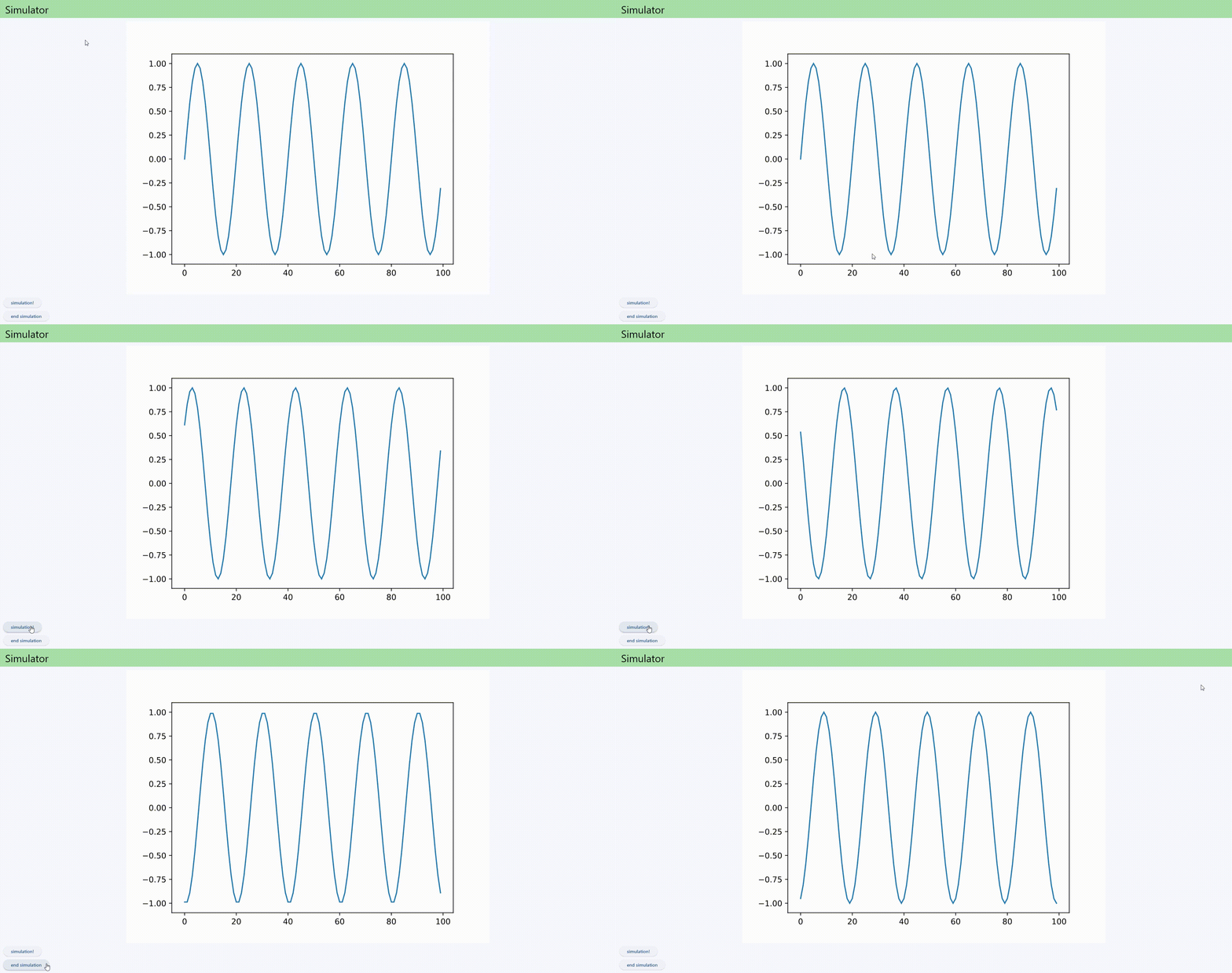
Flet で matplotlib をアニメーション表示する
Flutter ではなく Flet を使う場合のメリットとして考えられるのが numpy や matplotlib の使用だったので, matplotlib でアニメーションを表示してみる方法を調べた
検証環境
- Windows 11 Home
- Python 3.11.5
Flet について
- Flet は Flutter というマルチプラットフォームアプリケーションを作成するフレームワークを Python で使用できるようにしたもの
- 詳しくは 前回記事 参照のこと
目標
- flet で matplotlib の簡単なアニメーションを表示する
基本構成
- プロット用のページに matplotlib のグラフを表示し, 非同期処理でアニメーションの再生・停止を行う
- 非同期処理は公式で
asyncioがサポートされているためこれを使用 (async app)
コード全体
import flet as ft
import matplotlib.pyplot as plt
from flet.matplotlib_chart import MatplotlibChart
import numpy as np
import asyncio

animation_task = None

async def main(page: ft.Page):
    def route_change(e):
        page.views.clear()

        # routing
        if page.route == "/":
            page.views.append(main_page_view(page))
        elif page.route == "/plot":
            page_view = plot_page()
            page.views.append(page_view)

        # update
        page.update()

    page.on_route_change = route_change
    page.go("/") # home page

def main_page_view(page: ft.Page):
    return ft.View(
        "/",
        controls=[
            ft.SafeArea(ft.Text("Hello, FletApp!")),
            ft.ElevatedButton("to plot", on_click=lambda _: page.go("/plot"))
        ],
        appbar=ft.AppBar(
            title=ft.Text(
                value="Flet App", size=32,
                text_align="center", color=ft.colors.BLACK
            ),
            bgcolor=ft.colors.GREEN_200
        )
    )

def plot_page():
    fig = plt.figure()
    ax = fig.add_subplot()
    x = np.arange(100)
    y = np.sin(x * (np.pi / 10))
    plot_data = ax.plot(x, y)
    chart = MatplotlibChart(fig, expand=True)

    async def start_animation(e):
        global animation_task
        animation_task = asyncio.create_task(animation(fig, plot_data, chart))

    def end_animation(e):
        global animation_task
        if animation_task != None:
            animation_task.cancel()

    return ft.View(
        "/plot",
        controls=[
            chart,
            ft.ElevatedButton("animation!", on_click=start_animation),
            ft.ElevatedButton("end animation", on_click=end_animation)
            ],
        appbar=ft.AppBar(
            title=ft.Text(
                value="Simulator", size=32,
                text_align="center", color=ft.colors.BLACK
            ),
            bgcolor=ft.colors.GREEN_200
        )
        )

async def animation(fig, plot_data, chart):
    t = 0
    while True:
        x = np.arange(100)
        y = np.sin((x + t) * (np.pi / 10))
        plot_data[0].set_ydata(y)
        chart.figure = fig
        chart.update()

        t += 0.1
        await asyncio.sleep(0.01)

ft.app(main)
matplotlib の表示
matplotlibの図をアプリで表示させる場合はMatplotlibChart()を用いる- 今回は sin 波を作成し表示
fig = plt.figure()
ax = fig.add_subplot()
x = np.arange(100)
y = np.sin(x * (np.pi / 10))
plot_data = ax.plot(x, y)
chart = MatplotlibChart(fig, expand=True)
非同期更新処理の記述
- アニメーションの更新部分
asyncioを用いて非同期的にデータの更新を行うコードを作成
async def animation(fig, plot_data, chart):
    t = 0
    while True:
        x = np.arange(100)
        y = np.sin((x + t) * (np.pi / 10))
        plot_data[0].set_ydata(y)
        chart.figure = fig
        chart.update()

        t += 0.1
        await asyncio.sleep(0.01)
- 初めに
figureオブジェクトとプロットのオブジェクトを受け取り, プロットのオブジェクトの y データを更新したうえでMatplotlibChartを更新する - 0.01 秒ごとに 0.1 ずつ時間が進むように調整
アニメーションの開始・終了処理の作成
- 更新処理の関数 (
animation) を非同期タスクとしてバックグラウンドで実行するための関数と, すでに開始しているタスクを終了させる関数を作成 - それぞれの関数を開始ボタン・終了ボタンの
onclick処理に設定しておくことで任意のタイミングでアニメーションを開始・終了できるようにした
async def start_animation(e):
    global animation_task
    animation_task = asyncio.create_task(animation(fig, plot_data, chart))

def end_animation(e):
    global animation_task
    if animation_task != None:
        animation_task.cancel()
完成品
- sin 波が動くアニメーションを作成できた